Sage 200 Historical Data Migration: A Complete Guide to NetSuite, Business Central and Xledger
Moving from Sage 200 to a new ERP is not simply a matter of exporting data from one system and importing it into another.
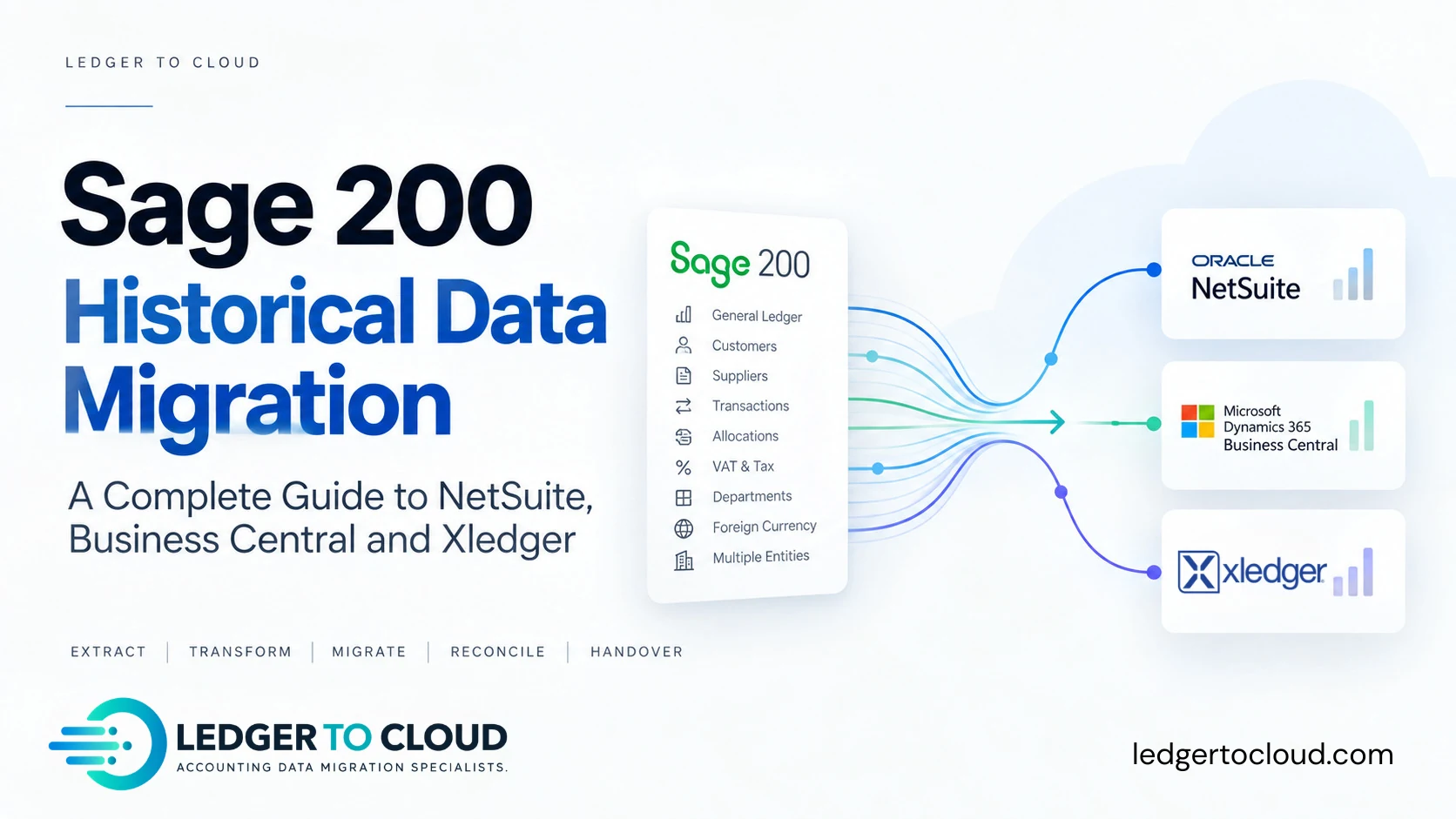
A historical Sage 200 migration can involve years of General Ledger transactions, customers, suppliers, invoices, payments, allocations, VAT, foreign currencies, departments, cost centres and multiple legal entities.
The challenge is not simply getting the data into NetSuite, Microsoft Dynamics 365 Business Central or Xledger. It is making sure the historical accounting data remains complete, traceable and reconcilable after it has been transformed to fit a completely different system.
Ledger to Cloud focuses specifically on this historical accounting data workstream. The ERP implementation partner designs and implements the destination. We prepare, migrate and reconcile the history around that agreed design.
What is a Sage 200 historical data migration?
A Sage 200 historical data migration is the process of extracting historical financial records from Sage 200, transforming them into the structure required by a new finance or ERP platform, loading the agreed history and reconciling the resulting accounting position back to the source.
Depending on scope, this may include several financial years of detailed transactions rather than simply an opening Trial Balance.
The destination could be NetSuite, Microsoft Dynamics 365 Business Central, Xledger or another modern finance platform.
There is an important distinction between ERP implementation and historical data migration. The implementation partner normally designs and configures the future ERP environment. The historical migration has a different job: take accounting history created under the legacy system's structure and reproduce the required financial history within the new structure while preserving the accounting integrity of the source data.
What Sage 200 data can be migrated?
Historical Sage 200 migrations can include the Chart of Accounts, General Ledger, customers, suppliers, sales and purchase transactions, receipts, payments, allocations, journals, VAT information, currencies and reporting dimensions.
The exact scope depends on the source environment, destination ERP and agreed project requirements. Sage 200, NetSuite, Business Central and Xledger use different data structures, so mapping and transformation are needed to preserve the accounting meaning of the source.
| Sage 200 data | Typical historical migration treatment |
|---|---|
| Chart of Accounts | Retain, consolidate or map to the future ERP structure |
| General Ledger | Historical transactional migration |
| Customers and suppliers | Map to destination customer/vendor records |
| Sales and purchase transactions | Migrate where included in historical scope |
| Receipts, payments and allocations | Transform and preserve relationships where supported and agreed |
| Departments and cost centres | Map to destination dimensions or segments |
| VAT / tax | Preserve required historical tax information |
| Foreign currency | Retain relevant currency and exchange-rate context |
| Open debtors and creditors | Reconcile to the agreed cutover position |
| Multiple entities | Migrate and reconcile at entity level |
Opening balances or full historical data?
Not every Sage 200 implementation needs a full historical migration. Opening balances may be appropriate where the business is comfortable retaining Sage 200 or another archive and does not require transactional history inside the new ERP.
A fuller historical migration becomes more relevant when the business needs comparative reporting, customer and supplier history, previous-year analysis, transaction-level drill-down, historical departmental reporting, current-year continuity, auditability, or wants to retire the legacy environment.
Start with: “What do we need to be able to do with our historical accounting data after go-live?” That should drive the scope.
For a deeper comparison, see our opening balances vs full historical accounting data migration guide.
Why can Sage 200 historical migrations become complicated?
Sage 200 migrations become complicated when the accounting structures and transaction relationships accumulated in the legacy system do not correspond directly with the future ERP design.
Common complications include Chart of Accounts changes, departments and cost centres that need to become new dimensions, historic manual postings, customer and supplier allocations, VAT, foreign currency, year-end journals and reversals, and multi-entity structures.
Transaction volume matters, but it is not the only factor. A smaller company with years of structural changes can require more migration judgement than a larger but cleaner dataset.
That is why we treat historical migration as an accounting data project, not simply a technical import.
How do you migrate historical data from Sage 200?
A controlled Sage 200 historical migration should separate extraction, transformation, loading and reconciliation into identifiable stages.
Scope → Extract → Control → Map → Transform → Migrate → Reconcile → Evidence → Handover
Separating these stages matters because an unexplained difference is considerably harder to diagnose when extraction, transformation and loading have effectively become one black box.
Phase 1: Define the migration scope
Before extracting data, we establish exactly what is being migrated: companies, years, cutover date, transactional detail, currencies, departments/cost centres, Chart of Accounts changes, allocations, tax history, group structure, intercompany requirements and destination design.
We also define what is not being migrated. That prevents “historical data” meaning one thing to the finance team, another to the implementation partner and something different again to the migration team.
Phase 2: Assess the Sage 200 source data
We review what actually exists in Sage 200, including account structures, dormant codes, customers and suppliers, historic departments, manual control-account postings, currencies, transaction types, future-dated items, allocations, year-end adjustments, reversals and data volumes.
The objective is not to make the legacy system perfect. It is to identify conditions that could affect migration and reconciliation.
Phase 3: Establish source control totals
Before historical data is transformed, establish what the Sage 200 accounting position should be.
Depending on scope, controls may include Trial Balance, General Ledger totals, Balance Sheet, Profit and Loss, aged receivables, aged payables, VAT/tax reports, bank balances, currency balances and entity or period totals.
Once hundreds of thousands of records have been transformed into a new ERP structure, investigating a difference is considerably harder if nobody established whether it already existed in Sage 200.
Phase 4: Extract the Sage 200 historical data
Historical migration normally requires several related Sage 200 datasets rather than one convenient export. Depending on scope, this can include General Ledger, sales ledger, purchase ledger, customers, suppliers, invoices, credit notes, receipts, payments, allocations, VAT/tax, currencies, departments, cost centres, journals and bank activity.
Our preferred extraction approach depends on the Sage 200 version, environment and access available. Extraction itself is validated because a successful export does not prove that every expected historical record was exported.
Phase 5: Design the destination mapping
Historical data rarely moves one-to-one from Sage 200 into a modern ERP. The implementation partner and finance team define the future reporting structure, and we apply that agreed design to the historical data.
Mappings may include old account → new account, Sage department → destination dimension, Sage cost centre → destination dimension, old customer/supplier → future record, and historic tax treatment → configured destination treatment.
This can also be an opportunity to restructure history around the future reporting model rather than reproducing every legacy reporting decision forever.
Phase 6: Transform the historical accounting data
Transformation converts extracted Sage 200 data into the structure required for the destination ERP. This can include account consolidation, dimensions, customers and suppliers, tax, currency, dates, transaction types, document references, balancing logic and entity mapping.
Transformation rules should be repeatable and auditable. The finance and implementation teams agree the required future structure; the migration process applies those decisions consistently to the historical population.
Phase 7: Customers, suppliers and allocations
Migrating a customer or supplier balance is much easier than migrating the accounting history behind that balance.
A ledger can contain invoices, credit notes, receipts/payments, partial allocations and open items. It is possible to reproduce the correct headline balance while losing those document relationships.
Where allocations form part of scope, they should be considered separately from the headline balance. Correct totals do not automatically mean correct historical data.
Phase 8: VAT and tax
Historical transactions may contain different VAT rates, zero-rated or exempt items, reverse-charge treatment, overseas transactions, historic tax codes and manual adjustments.
The destination ERP may represent these differently. The objective is not necessarily to reproduce the name of every Sage 200 tax code, but to preserve the required historical accounting and tax information according to the agreed migration design.
Phase 9: Foreign currencies
Foreign-currency history can involve transaction currency, source exchange rate, base-currency value, settlement information and realised or unrealised exchange differences.
Validation therefore cannot stop at confirming that the foreign-currency invoice amount matches. The relevant base-currency accounting impact and currency balances may also need to reconcile.
Phase 10: Multi-entity Sage 200 migrations
A Sage 200 group migration requires a repeatable methodology across multiple legal entities while still allowing every company to reconcile independently.
Questions include whether companies will share a Chart of Accounts, whether dimensions are being standardised, currencies and tax regimes, intercompany relationships, consolidated reporting and migration sequencing.
Our wider migration experience includes a 34-company Sage 200 migration involving approximately 3.2 million accounting lines. That project forms part of the migration experience behind Ledger to Cloud; it is not presented as a claim that its destination was NetSuite, Business Central or Xledger.
For a large group, an appropriate entity can often be used to validate the methodology before the agreed transformation framework is repeated across the remaining companies.
Phase 11: Test the migration before going live
Where the destination and project permit it, our preferred methodology is to migrate historical data into a sandbox, demo or test environment before importing anything into live.
This lets the finance team and implementation partner review the transformed history inside the destination environment and validate mapping, dimensions, customers and suppliers, allocations, tax, currencies, source references, reporting and reconciliation.
We reconcile the test migration back to Sage 200 and review the result with the client. Only once the agreed result is confirmed do we proceed to live. Where possible, the same approved migration files and transformation rules are then used for the live migration.
Phase 12: Reconcile and validate the migration
An import completing successfully tells you that the destination accepted the data. It does not tell you that the accounting migration is correct.
Depending on scope, reconciliation can include Trial Balance, Profit and Loss, Balance Sheet, aged receivables, aged payables, VAT/tax, historical periods, individual entities and transaction completeness.
The last point is easily overlooked: did the expected population of historical records actually reach the destination?
Why is a matching Trial Balance not enough?
A matching Trial Balance is an important control, but it does not prove that the underlying historical dataset is complete or correctly represented.
A Trial Balance could agree while transactions are missing, allocations are wrong, customer or supplier history is incomplete, dimensions are mis-mapped, VAT detail is incomplete, dates are wrong, references are lost or foreign-currency treatment is incorrect.
In one historical migration rescue project, approximately 16,000 General Ledger lines were found to be missing from the previous migration. The headline accounting position alone was not sufficient evidence that the historical population was complete.
Phase 13: Investigate migration differences
A difference does not automatically mean the migration process is wrong. It can arise from an existing source inconsistency, manual control-account postings, date versus accounting-period differences, rounding, currency treatment, year-end adjustments, reversals, mapping decisions, incomplete extraction or destination behaviour.
In one migration project, year-end and reversal behaviour contributed to an unexplained difference of £24,297.48. It had to be traced and resolved before the historical accounting position could be signed off.
The wrong response is an unexplained balancing journal created purely to force agreement. The right response is to understand why the difference exists.
Phase 14: Final migration and cutover
Once mapping, testing and reconciliation have been agreed, the final migration can be planned around ERP cutover. A typical sequence is final Sage 200 cut-off → source extraction → source control reports → transformation → destination load → reconciliation → exception investigation → finance-team review → handover.
Mid-year migrations deserve particular attention because current-year continuity can create different requirements from a clean year-end cutover.
Phase 15: Evidence, VAT/GST support and handover
The final deliverable should not simply be “import complete”. A historical accounting migration should leave evidence showing how the migrated position was validated.
Depending on scope, our reconciliation pack can include Trial Balance, aged receivables/payables, VAT sampling, relevant historical controls, identified exceptions and agreed explanations.
Where included in scope, we also assist with the first VAT/GST return and submission, including late-reconciled migration-period items where needed. Our standard post-migration support includes two months of email support for the client, plus one additional month of migration-related support for the implementation partner.
Questions about historical data do not always appear on go-live day. The support period gives both teams a practical route back to the migration workstream while the new environment settles.
Sage 200 to NetSuite historical data migration
A Sage 200 to NetSuite historical migration requires the legacy accounting dataset to be transformed around the NetSuite environment designed by the implementation partner.
Historical mapping may need to consider the NetSuite Chart of Accounts, subsidiaries in OneWorld environments, customers, vendors, currencies, departments, classes, locations and other agreed reporting structures.
The implementation partner defines the future NetSuite environment and appropriate loading method. Ledger to Cloud prepares, transforms and reconciles the Sage 200 historical accounting dataset around that agreed design.
Explore our Sage 200 to NetSuite historical data migration service →
Official reference: Oracle documents the NetSuite CSV Import Assistant and its OneWorld subsidiary and record-matching requirements. These destination rules are part of why the future NetSuite structure should be agreed before historical data is transformed.
Sage 200 to Microsoft Dynamics 365 Business Central historical data migration
A Sage 200 to Business Central migration needs to distinguish between configuring the new environment and reproducing posted historical accounting activity.
The implementation design determines how the required history should be represented and loaded. Historical transformation may need to consider the Business Central Chart of Accounts, companies, dimensions, customers, vendors, currencies, tax setup, posting requirements and historical transaction design.
The Business Central implementation partner owns the future configuration. Ledger to Cloud prepares and reconciles the historical Sage 200 accounting data around that design.
Explore our Sage 200 to Business Central historical data migration service →
Official reference: Microsoft documents Business Central configuration packages, including the important limitation that configuration packages cannot import directly into tables containing posted entries such as customer, vendor and item ledger entries. Historical posted data therefore needs to be planned with the Business Central implementation partner rather than treated as a generic spreadsheet import.
Sage 200 to Xledger historical data migration
A Sage 200 to Xledger migration can retain significantly more than opening balances, including detailed transactions, allocations and foreign-currency history.
Xledger's import features support detailed historical migration. Depending on scope, we can prepare the Chart of Accounts, General Ledger history, customers and suppliers, sales and purchase transactions, receipts and payments, allocations, dimensions, VAT/GST information, foreign-currency transactions and multiple entities.
Where appropriate, we retain original Sage 200 references in the migrated data so historical transactions can be traced back to the source at any point in time.
A typical Xledger migration sequence
For a typical scoped migration, preparation may take around 2–3 working days, followed by approximately 2 working days for the import and 1–2 working days for reconciliation and client review. Larger, higher-volume or multi-entity projects can take longer.
The data is initially migrated into an Xledger sandbox/demo environment. The client can inspect the result and we review reconciliations and any differences, including discrepancies caused by limitations or historic treatment in the old system.
Once the sandbox result is approved, the live migration follows the same controlled process using the same approved migration files. We then reconcile the live result again.
After migration, we can assist with the first VAT/GST return and submission, include late-reconciled migration-period items where needed, provide two months of client email support and an additional month of migration-related support for the implementation partner.
Explore our Sage 200 to Xledger historical data migration service →
Who is responsible for what?
The ERP implementation and historical migration are complementary workstreams.
| ERP implementation partner | Ledger to Cloud |
|---|---|
| Designs and configures destination ERP | Analyses and extracts Sage 200 history |
| Defines future Chart of Accounts | Applies agreed historical mapping |
| Defines dimensions and reporting | Transforms legacy reporting structures |
| Configures destination tax | Maps required historical tax information |
| Defines import requirements | Prepares historical datasets |
| Owns wider ERP implementation | Owns historical migration workstream |
| Provides ongoing system support | Reconciles and hands over historical data |
What can go wrong during a Sage 200 migration?
Common historical migration risks include incomplete extraction, missing or duplicated transactions, incorrect mapping, subledger differences, allocations, VAT, foreign currency and period-related problems.
Other risks include aged receivables/payables not reconciling, year-end journals or reversals being treated incorrectly, intercompany differences, lost document references and unexplained balancing journals.
A migration can therefore finish technically while leaving the finance team with months of investigation. Reconciliation should be designed into the methodology, not added after something goes wrong.
How long does a Sage 200 historical data migration take?
There is no reliable universal timeframe because the work depends on entities, years, transaction volume, currencies, source quality, reporting structures and the amount of transformation required.
For a typical scoped Xledger migration, data preparation may take around 2–3 working days, the import around 2 working days and reconciliation/client review around 1–2 working days. This is indicative only. Complex, high-volume and multi-entity projects can take longer.
A straightforward single-company migration is fundamentally different from a 30-company group moving to a standardised reporting structure, so we scope the historical workstream around the actual dataset rather than promising a universal conversion window.
What should the ERP implementation partner provide?
Ideally, the historical migration team should understand the destination Chart of Accounts, entity structure, reporting dimensions, customer/vendor requirements, relevant tax configuration, currencies, required historical scope, import specifications, cutover date, test environment and agreed treatment of historical transactions.
Not everything needs to be final on day one, but historical data cannot be mapped reliably into a future structure that has not yet been defined.
See also how Ledger to Cloud works with ERP implementation partners.
How do you know a Sage 200 migration is correct?
A successful migration should demonstrate that the agreed historical population was transferred according to the approved destination structure and that the relevant accounting controls reconcile to Sage 200, subject to documented and agreed differences.
The finance team should be able to answer five questions: Did we migrate what we intended? Is it in the right place? Does the accounting position reconcile? Can we explain any differences? Can we use the history for the purpose we migrated it for?
If the answer to all five is yes, the project has achieved something much more meaningful than a technically successful import.
Frequently asked questions
Short answers to common questions about Sage 200 historical accounting data migration.
Can Sage 200 historical data be migrated to NetSuite?
Yes. Sage 200 historical accounting data can be extracted and transformed around the agreed NetSuite structure, with the loading method and destination configuration agreed with the NetSuite implementation partner.
Can Sage 200 historical data be migrated to Business Central?
Yes. Historical Sage 200 data can be transformed for Microsoft Dynamics 365 Business Central. The migration design needs to distinguish between destination configuration and the treatment of posted historical accounting activity.
Can Sage 200 historical data be migrated to Xledger?
Yes. Xledger supports detailed historical imports, including transactions, allocations and foreign-currency data. We normally test the migration in a sandbox/demo environment, reconcile it and obtain client approval before repeating the approved process in live.
Can you test a Sage 200 migration before going live?
Yes. Where the destination permits it, we prefer a sandbox, demo or test migration first. The historical data can then be reconciled and reviewed before the same approved migration files and rules are used for live.
Can original Sage 200 transaction references be retained?
Yes, where supported by the agreed destination design. We aim to retain original legacy-system references so historical transactions can be traced back to their Sage 200 source.
Do we need to migrate all our Sage 200 history?
No. Some organisations migrate opening balances only, while others migrate the current year, selected previous years or a much longer transactional history. The decision should follow the reporting, audit and operational requirement.
Can the Chart of Accounts be restructured during migration?
Yes, where the future structure has been agreed. Historical transactions can be mapped from legacy Sage 200 accounts into a redesigned Chart of Accounts during transformation.
Can Sage 200 departments and cost centres be migrated?
They can be mapped to the appropriate destination reporting structure where included in scope. The future reporting design should drive the mapping rather than assuming a one-to-one field match.
Can foreign-currency transactions be migrated?
Yes. Foreign-currency history can be migrated, but transaction currency, exchange rates, base-currency values, settlement and revaluation need to be considered explicitly.
Can customer and supplier allocations be retained?
Potentially, depending on the destination and agreed scope. Xledger, for example, supports allocation migration. Allocations should be validated separately from the headline debtor or creditor balance.
Is a matching Trial Balance enough to validate a Sage 200 migration?
No. It is an important control, but it does not prove transaction completeness, allocations, aged-ledger accuracy, dimensions, VAT detail, source references or foreign-currency treatment.
What support is available after migration?
Our standard post-migration support includes two months of email support for the client and one additional month of migration-related support for the implementation partner. Where included in scope, we also assist with the first VAT/GST return and submission and late-reconciled migration-period items.
Plan the historical workstream before cutover.
Ledger to Cloud works alongside finance teams and ERP implementation partners to extract, transform, restructure, migrate and reconcile historical Sage 200 accounting data.
You implement the destination. We handle the historical ledger.